Updating your Florida address once won’t change every record. Your driver license, vehicle registration, toll account, and bills may each be tied to your old home. Knowing how to change your address when you move in Florida means handling several separate updates.
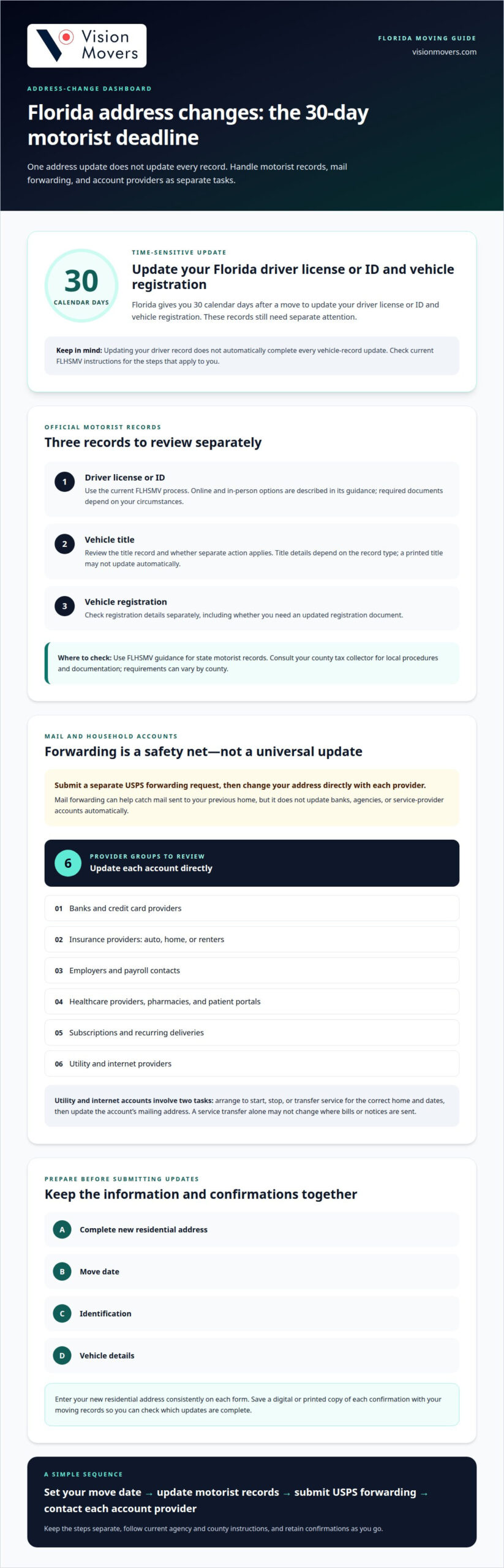
It’s easy to expect one simple process, especially when you’re also managing packing, utilities, and moving-day details. Florida gives you 30 calendar days to update your driver license or ID and vehicle registration, but these records still need separate attention. USPS mail forwarding can help catch mail sent to your old home, but it won’t notify agencies, banks, or service providers of your new address.
This checklist starts with time-sensitive government records, then covers mail, household accounts, and move coordination. Use it to identify which updates to make separately, where to begin, and how to reduce the chance of missed bills or important notices during your transition.
Key Takeaways
- Follow a clear sequence for how to change your address when you move in Florida, starting with motorist records and then updating other accounts.
- Submit a separate USPS forwarding request, then update banks, insurers, employers, subscriptions, and healthcare providers directly.
- Save confirmation details and review your mail during the first week at your new home to catch updates you may have missed.
- Add address changes to your moving schedule so account updates, packing, and move-day access stay organized.
Moving in Florida? Start with These Address-Change Priorities
Address updates are separate tasks, not one universal change. Government agencies, USPS, and private account providers each maintain their own records. In Florida, your driver license or ID and vehicle records also require separate attention. Completing one update doesn’t mean the others are finished.
Keep the process manageable by working through these steps:
- Establish your move date. Use your relocation date to plan time-sensitive updates, and enter your new residential address consistently on each form.
- Handle official records. Start with your Florida driver license or ID, then review your vehicle title and registration as separate items. The Florida Department of Highway Safety and Motor Vehicles oversees state motorist records. Follow its current guidance for the applicable steps.
- Update services and accounts. Submit a separate USPS request and contact each business or provider that sends you bills, notices, or account communications.
What to prepare before submitting address changes
Before starting, gather your complete new residential address, move date, identification, and vehicle details. Having this information ready can help you complete forms accurately. Save a digital or printed copy of each confirmation with your moving records. If a notice goes to your former address, you can use those records to see which updates you’ve completed.
Florida’s statewide rules versus county procedures
Use FLHSMV guidance for state motorist records, and consult your county tax collector for local service details, including applicable procedures and documentation. Requirements can vary by county, so don’t assume an example from Volusia County applies statewide. Review your county office’s instructions to prepare for the process relevant to your move.
How to Update Your Florida Driver License, ID, and Vehicle Records
Handle your Florida motorist records in sequence: update your driver license or ID, then review your vehicle title and registration records separately. Current FLHSMV guidance gives drivers and ID card holders 30 days after a move to obtain a replacement credential showing the new address. It also sets a 30-day window for updating vehicle registration records. The FLHSMV driver license address update guidelines describe the current process, including online and in-person options.
Your driver record, vehicle title record, and registration record are related, but changing one address does not complete every vehicle-record update. Keep the deadline in view and check the current instructions before submitting a request.
- Update the address on your Florida driver license or ID.
- Review the vehicle title record and determine whether separate action applies to your record type.
- Check your vehicle registration details and complete the required update separately.
What to know about updating a Florida license or ID
Use FLHSMV’s current process to choose an available online or in-person method. Required documents depend on your circumstances, so don’t assume every applicant follows the same steps. If you plan to visit a county office, review its document instructions before making the trip. Keep your confirmation after submitting the address change.
Remember vehicle title and registration records
After updating your driver information, review both your title and registration records rather than assuming they changed together. An electronic title record may reflect a driver-profile update, but title details depend on the record type, and a printed title doesn’t necessarily update automatically. Vehicle registration is a separate item to check, including whether you need an updated registration document. Confirm the steps that apply to your vehicle with FLHSMV or your county tax collector.
As you work through official records, coordinate paperwork with packing and move-day access. Residential moving support from Vision Movers can help keep the physical move organized while you complete these separate updates.
Update USPS, Household Bills, and Accounts After Your Florida Move
Once your motorist records are underway, turn to mail and household accounts. A USPS forwarding request can help catch mail sent to your previous home, but it doesn’t replace updating your address with each agency or provider. A USPS forwarding request does not update every account automatically. For a complete plan for how to change your address when you move in Florida, treat forwarding as a safety net and contact each account provider directly.
Set up mail forwarding without relying on it alone
Use USPS’s official change-of-address process and choose a start date that fits your move. Forwarding can help redirect eligible mail, but it won’t change the address on your bank profile, insurance policy, or other account. Submit provider updates separately and save each confirmation so you can follow up if mail or billing details still go to your old home.
Prioritize accounts that send time-sensitive information
Start with accounts that may send bills, policy notices, employment documents, or healthcare information. Then work through the rest of your household checklist:
- Banks and credit card providers
- Insurance providers, including auto, home, or renters coverage
- Employers and payroll contacts
- Healthcare providers, pharmacies, and patient portals
- Subscriptions and recurring deliveries
- Utility and internet providers
Utilities and internet involve two separate tasks: arrange to start, stop, or transfer service for the correct home and dates, then update the mailing address on the account. A service transfer alone may not change where bills or notices are sent. Review confirmation messages and your next billing statements for an old address or an incomplete request.
Keep this account checklist with your packing and move schedule. For help coordinating a South Florida residential move, plan your move with Vision Movers.
Keep Your Florida Move Organized and Make the Next Step Easier
A simple timeline helps prevent address changes from getting lost among packing, service arrangements, and move-day access. As you work through how to change your address when you move in Florida, record each request and leave time to follow up if a confirmation or account update takes longer than expected.
Build a simple move-and-update timeline
- Before moving: Submit address changes that can be arranged ahead of time, schedule utility and internet service for the right dates, and save each confirmation.
- During move week: Keep essential documents and account details accessible. Coordinate building or home access with packing and loading plans.
- After arrival: Check mail delivered to your new home, review account messages and statements, and update any providers you missed.
Keep the checklist in one place, on paper or in a digital note. Mark a task complete only after saving its confirmation, and set reminders to follow up on requests that aren’t finalized. If a piece of mail arrives with your old address, use it as a prompt to check whether that account still needs an update.
When professional moving support can help
Moving support can make the physical side of your transition easier to coordinate. Vision Movers provides packing, loading, unloading, and transportation for residential moves in South Florida. Use the local moving service guide to plan practical moving details alongside your address updates.
For a free personalized estimate, call 561-618-0949. Vision Movers is fully licensed and fully insured for both local and long-distance moves. All belongings are insured, and additional insurance is available if needed. Prices are completely transparent with no hidden fees. Exact costs are provided through a free personalized estimate.
Make Space to Settle Into Your New Florida Home
Your move can be more than a change of address. It’s an opportunity to set up your new home and routines with care instead of carrying unfinished tasks forward. Keep your records and confirmations somewhere easy to find, and leave room to handle follow-up as you settle in. A steady plan for how to change your address when you move in Florida can make the transition more manageable.
If coordinating the physical move is taking time away from getting settled, Vision Movers can help with your move. Request a free personalized estimate through Vision Movers or call 561-618-0949.
With a clear plan and the right support, you can focus on making your new Florida home feel like yours.
Frequently Asked Questions
Does changing my address with USPS update my Florida driver license?
No. A USPS change-of-address request redirects eligible mail; it doesn’t change your Florida driver license or ID record. Submit that update through FLHSMV separately, then confirm your credential reflects the new address. The same distinction applies whether you’re moving between Miami, Fort Lauderdale, Boca Raton, Brickell, Weston, Plantation, Pompano Beach, Broward County, Hollywood, Dania Beach, Coral Springs, or Parkland: mail routing and state records are separate.
Can I change my address before I move in Florida?
You can prepare your information and plan submissions before moving, but use your actual move date to guide each update. Current FLHSMV guidance gives you 30 days after moving to obtain a replacement driver license or ID with your new address. For USPS forwarding, choose a start date that aligns with your relocation and follow the official instructions for scheduling the request.
What documents do I need to change my address on a Florida license?
The required documents depend on your circumstances and whether you apply online or in person. FLHSMV allows eligible REAL ID holders, marked with a gold star, to use MyDMV Portal if they don’t need a legal name change. In-person applicants generally need two proofs of residential address. Examples and document date rules can vary by county, so follow your county tax collector’s current instructions.
Do I need to update my Florida vehicle registration when I move?
Yes. Florida vehicle registration addresses must be updated separately from your driver license or ID address, within 30 days of moving. After changing your driver information, check the registration record and document to see whether a separate update or replacement is needed. Don’t assume an updated driver profile has taken care of every vehicle record, especially if you own more than one registered vehicle.
Will mail forwarding send every letter and package to my new Florida address?
No. Forwarding isn’t a guarantee that every item will reach you, and it doesn’t replace updating your address directly with senders. USPS lists a 12-month forwarding period for First-Class Mail, USPS Ground Advantage, and Priority Mail under a permanent change of address. Check the forwarding terms for other mail or packages, and update important accounts so future notices go straight to your new address.
Leave a Reply